Traffic Split
Distribute traffic across weighted upstream targets for staged migration, canary, or A/B workflows.
Always confirm availability in the release bundle selected for deployment.
At a glance
| Property | Value |
|---|---|
| Pipeline phase | Router |
| Category | Traffic |
| Canonical minimum tier | Pro |
| Canonical entitlement | Yes |
| Supported deployment contract | Yes |
| Release status | Catalog component; confirm a bundle that executes router-phase components. |
Release accuracy
- Current documentation: Catalog component; confirm a bundle that executes router-phase components.
Where any detail below conflicts with the release status above, the release status is authoritative. Field names and examples describe the current dashboard and CRD surface; always confirm behavior against the selected release bundle before relying on it operationally.
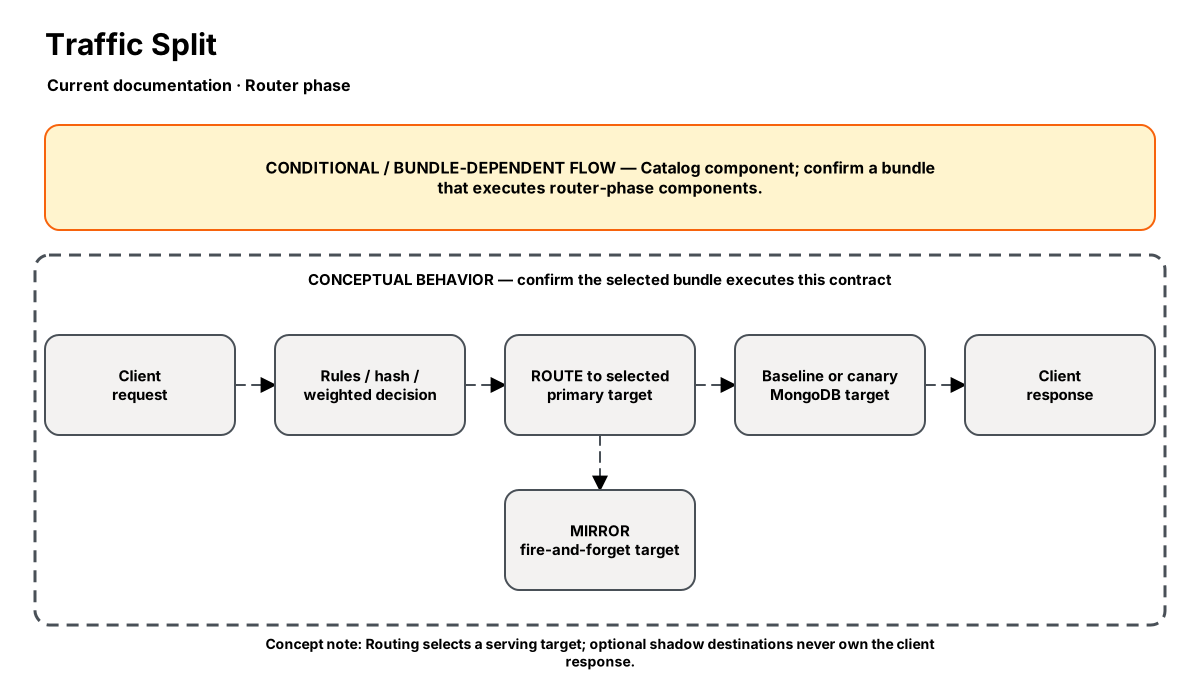
Release-aware feature flow. The diagram is explanatory; the release status on this page is authoritative.
Diagram resources: Open the SVG full screen · Download the editable Excalidraw source
Performance impact
:::warning Unverified performance figures
These figures are illustrative only. They are not current benchmarks or service guarantees and have not been verified by the current test suite.
:::
| Percentile | Reported figure |
|---|---|
| P50 | 0.05ms |
| P95 | 0.12ms |
| P99 | 0.20ms |
Note: Routing is an in-memory decision. Canary and A/B tracking reuse request-response context.
Overview
Traffic Split routes MongoDB requests across multiple upstream targets. The step supports weighted routing, request/connection/collection affinity, rule-based overrides, shadow targets, gradual canary rollouts, canary health rollback, header-based routing, and per-target A/B metrics.
When to use
- Gradually shift live traffic from one cluster to another
- Canary a new backend and roll back automatically on elevated errors
- Route premium/internal traffic to a dedicated target using an OP_MSG field
- Compare latency and error rates between targets during migrations or experiments
How it works
- The step evaluates routing rules first, then optional header_routing, and finally falls back to weighted routing.
- split_by controls whether the decision is per request, per connection, or deterministic per collection using an FNV hash.
- If gradual_rollout is enabled, the configured target's effective weight is interpolated linearly from start_weight to end_weight over duration_sec.
- Shadow targets are appended as fire-and-forget destinations alongside the primary target.
- ProcessResponse records per-target latency/error metrics; canary_health can force the canary back to its start weight (or zero) once min_requests is met and the error threshold is exceeded.
Configuration
“Not specified” means required semantics were not declared for that field.
| Field | Type | Default | Required | Description |
|---|---|---|---|---|
targets | json | — | Yes | Exact Go config: [{name, address, weight, tls?, shadow?, sample_rate?}] |
split_by | select | request | No | request, connection, or collection |
rules | json | — | No | Optional array of {database?, collections?, commands?, target_name} |
gradual_rollout | json | — | No | Pro: {enabled, target_name, start_weight, end_weight, duration_sec} |
canary_health | json | — | No | Pro: {enabled, target_name, error_threshold_pct, min_requests} |
header_routing | json | — | No | Business: {enabled, field, values:{fieldValue: targetName}} |
ab_metrics | json | — | No | Business: {enabled} |
Settings reference
No additional settings reference is documented for this component.
Examples
Progressive canary rollout with automatic rollback
steps:
  - name: builtin:traffic-split
    config:
      split_by: request
      targets:
        - name: primary
          address: "mongo-primary.internal:27017"
          weight: 95
        - name: canary
          address: "mongo-canary.internal:27017"
          weight: 5
      gradual_rollout:
        enabled: true
        target_name: canary
        start_weight: 5
        end_weight: 40
        duration_sec: 1800
      canary_health:
        enabled: true
        target_name: canary
        error_threshold_pct: 10
        min_requests: 200
Route premium tenants and collect A/B metrics
steps:
  - name: builtin:traffic-split
    config:
      split_by: connection
      targets:
        - name: standard
          address: "mongo-standard.internal:27017"
          weight: 100
        - name: premium
          address: "mongo-premium.internal:27017"
          weight: 10
        - name: shadow-analytics
          address: "mongo-shadow.internal:27017"
          weight: 1
          shadow: true
          sample_rate: 25
      header_routing:
        enabled: true
        field: tenant_tier
        values:
          premium: premium
      ab_metrics:
        enabled: true
Best practices
- Use rules or header_routing for deterministic overrides, then rely on weighted routing for the bulk split
- Keep canary start_weight small and pair gradual_rollout with canary_health
- Enable ab_metrics during experiments so you can compare latency and error rate per target
- Use collection affinity only when you want the same namespace to stay on the same backend
Limitations
- header_routing only inspects top-level fields in the OP_MSG command body
- Collection affinity ignores weights once a collection hash is chosen
- Canary rollback needs response processing to observe errors and update metrics
Security and operational guidance
- Establish health checks and rollback
- Validate session and write behavior
- The pinned Proxy controller does not watch NexoTrafficSplit directly
Related steps
Release availability
- Current documentation: Catalog component; confirm a bundle that executes router-phase components.
See the component catalog for the complete comparison matrix.