Rate Limiting
Apply token-bucket request budgets by client, connection, tenant, or database.
Always confirm availability in the release bundle selected for deployment.
At a glance
| Property | Value |
|---|---|
| Pipeline phase | Request |
| Category | Security |
| Canonical minimum tier | Pro |
| Canonical entitlement | Yes |
| Supported deployment contract | Yes |
| Release status | Catalog component. |
Release accuracy
- Current documentation: Catalog component.
Where any detail below conflicts with the release status above, the release status is authoritative. Field names and examples describe the current dashboard and CRD surface; always confirm behavior against the selected release bundle before relying on it operationally.
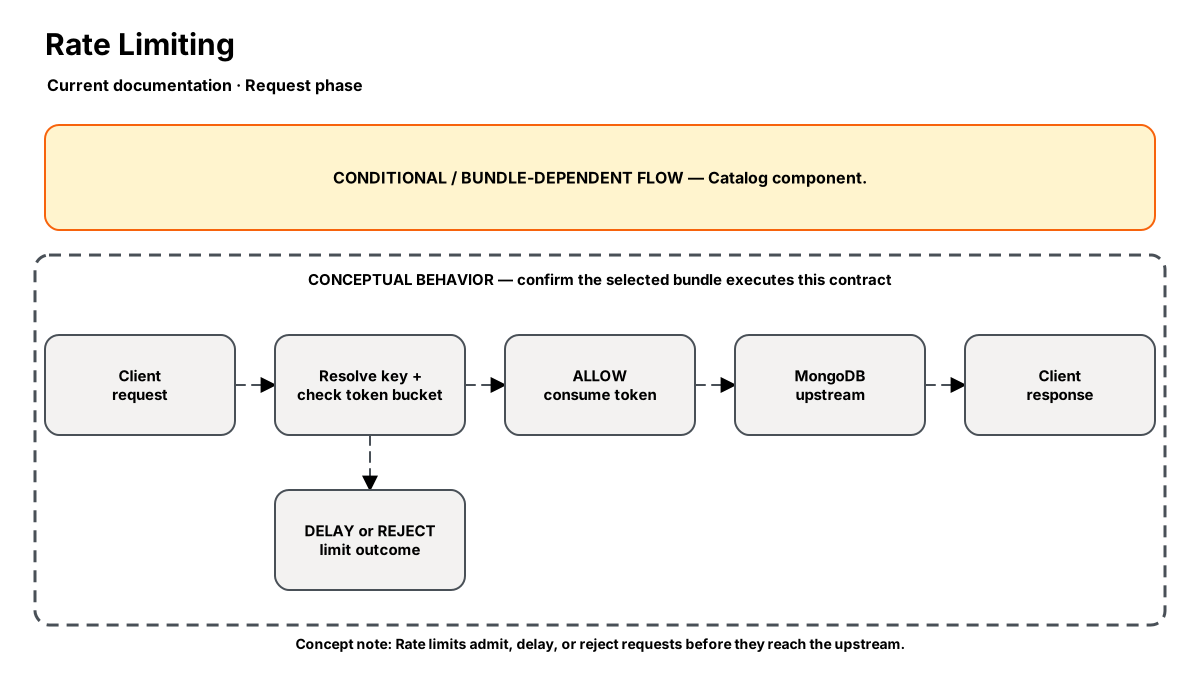
Release-aware feature flow. The diagram is explanatory; the release status on this page is authoritative.
Diagram resources: Open the SVG full screen · Download the editable Excalidraw source
Performance impact
:::warning Unverified performance figures
These figures are illustrative only. They are not current benchmarks or service guarantees and have not been verified by the current test suite.
:::
| Percentile | Reported figure |
|---|---|
| P50 | 0.05ms |
| P95 | 0.12ms |
| P99 | 0.20ms |
Note: In-memory token bucket. O(1) check and decrement.
Overview
The Rate Limiting step enforces request quotas at the proxy layer using a token bucket algorithm. Limits can be applied per client IP, per authenticated user, per tenant, or globally.
This protects shared MongoDB clusters from individual clients or tenants consuming disproportionate resources — the "noisy neighbor" problem in multi-tenant architectures.
When to use
- Multi-tenant environments where one tenant could overwhelm shared resources
- Protecting MongoDB from accidental request storms (retry loops, batch jobs)
- Enforcing SLA-based quotas per customer tier
- Gradual rollout — limit new clients until their access patterns are validated
How it works
- Request phase: Extracts the rate limit key (client IP, user, tenant ID).
- Checks the token bucket for that key — if tokens available, deduct one and pass through.
- If no tokens: return a synthetic error (or delay) based on configured action.
- Buckets are refilled at the configured rate (e.g., 1000 req/s per client).
- Token state is stored in-memory with periodic sync to Redis for multi-instance deployments.
Configuration
“Not specified” means required semantics were not declared for that field.
| Field | Type | Default | Required | Description |
|---|---|---|---|---|
key | select | — | Yes | Rate limit key: client_ip, auth_user, tenant_id, or global |
requests_per_second | number | — | Yes | Allowed requests per second per key |
burst | number | 50 | No | Maximum burst size (token bucket capacity) |
action | select | reject | No | Action when limit exceeded: reject, delay, or log_only |
exclude_commands | json | — | No | Commands exempt from rate limiting (e.g., hello, isMaster) |
Settings reference
No additional settings reference is documented for this component.
Examples
Per-tenant rate limiting
steps:
  - name: builtin:rate-limit
    config:
      key: tenant_id
      requests_per_second: 1000
      burst: 100
      action: reject
      exclude_commands: ["hello", "isMaster"]
Best practices
- Always exclude handshake commands (hello, isMaster) from rate limiting
- Set burst to 2-5× the per-second rate to handle legitimate traffic spikes
- Start with action: log_only to understand your baseline before enforcing
- Use per-tenant limiting in multi-tenant environments for fairness
Limitations
- In-memory state is per-proxy-instance — use Redis sync for distributed rate limiting
- Cannot rate limit by query complexity (only request count)
- Token bucket doesn't enforce sustained rates — bursty traffic is allowed up to burst limit
Security and operational guidance
- Use authenticated tenant identity for tenant limits
- Coordinate with connection budgets and client backoff
- Alert on sustained throttling rather than silently masking capacity problems
Related steps
Release availability
- Current documentation: Catalog component.
See the component catalog for the complete comparison matrix.