Query Size Limit
Reject or observe MongoDB messages that exceed a configured byte threshold.
Always confirm availability in the release bundle selected for deployment.
At a glance
| Property | Value |
|---|---|
| Pipeline phase | Request |
| Category | Security |
| Canonical minimum tier | Free |
| Canonical entitlement | Yes |
| Supported deployment contract | Yes |
| Release status | Catalog compatibility alias under the Query Guard entitlement. |
Release accuracy
- Current documentation: Catalog compatibility alias under the Query Guard entitlement.
Where any detail below conflicts with the release status above, the release status is authoritative. Field names and examples describe the current dashboard and CRD surface; always confirm behavior against the selected release bundle before relying on it operationally.
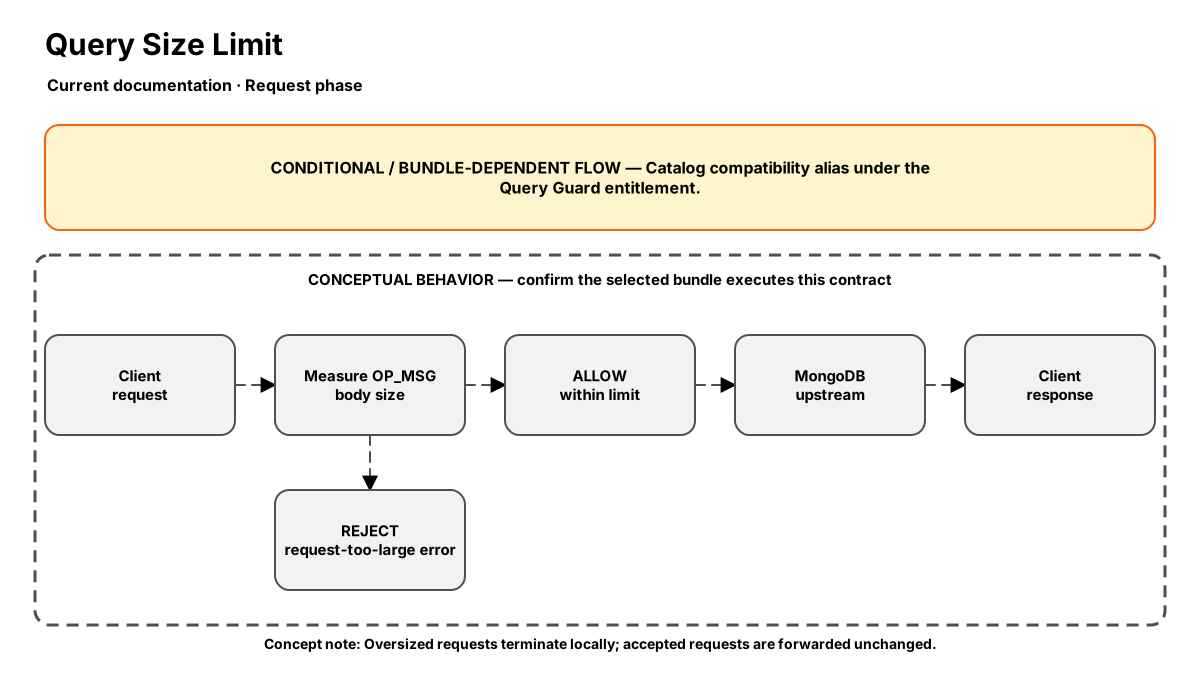
Release-aware feature flow. The diagram is explanatory; the release status on this page is authoritative.
Diagram resources: Open the SVG full screen · Download the editable Excalidraw source
Performance impact
:::warning Unverified performance figures
These figures are illustrative only. They are not current benchmarks or service guarantees and have not been verified by the current test suite.
:::
| Percentile | Reported figure |
|---|---|
| P50 | 0.02ms |
| P95 | 0.05ms |
| P99 | 0.08ms |
Note: Single integer comparison — the fastest possible step. Zero allocations.
Overview
The Query Size Limit step enforces a maximum request body size at the proxy layer — before the query reaches MongoDB. This protects your cluster from accidental (or malicious) oversized bulk inserts, large document writes, or runaway aggregation pipelines.
When a request exceeds the limit, the proxy returns a synthetic error response to the client without forwarding the request to MongoDB, preserving server resources.
When to use
- Protecting MongoDB from accidental bulk inserts that exceed memory limits
- Enforcing API contracts where request size should be bounded
- Preventing a single client from saturating network bandwidth to the cluster
- Defense-in-depth alongside MongoDB's built-in 16MB BSON limit
How it works
- Request phase only: Reads the OP_MSG body length from the wire protocol header (no BSON parsing needed).
- Compares against the configured max size.
- If exceeded: returns a synthetic OP_MSG error response (
\{ok: 0, errmsg: "request too large"\}) and short-circuits the pipeline. - If within limit: passes through unchanged.
Configuration
“Not specified” means required semantics were not declared for that field.
| Field | Type | Default | Required | Description |
|---|---|---|---|---|
max_size_bytes | number | 4194304 | Yes | Maximum allowed request body size in bytes |
action | select | block | No | What to do when limit is exceeded: block or warn |
Settings reference
No additional settings reference is documented for this component.
Examples
Block requests over 4MB
steps:
  - name: builtin:query-size-limit
    config:
      max_size_bytes: 4194304
      action: block
Warn but allow (monitoring mode)
steps:
  - name: builtin:query-size-limit
    config:
      max_size_bytes: 8388608
      action: warn
Best practices
- Set to 4MB (4194304) as a sensible default — most legitimate queries are under 1MB
- Use "warn" mode first in production to understand your baseline before blocking
- Pair with Metrics step to track
nexo_oversized_requests_totalcounter
Limitations
- Checks total message size, not individual document size within a batch
- Cannot differentiate between insert and query payloads (applies uniformly)
Security and operational guidance
- Account for legitimate bulk operations
- The limit applies to the complete message rather than each document
- Roll out with observation before rejection where possible
- The pinned Proxy controller does not watch NexoQuerySizeLimit directly
Related steps
Release availability
- Current documentation: Catalog compatibility alias under the Query Guard entitlement.
See the component catalog for the complete comparison matrix.