Query Rewrite
Rewrite eligible database names, collection names, or fields before forwarding a request.
Always confirm availability in the release bundle selected for deployment.
At a glance
| Property | Value |
|---|---|
| Pipeline phase | Request |
| Category | Transform |
| Canonical minimum tier | Pro |
| Canonical entitlement | Yes |
| Supported deployment contract | Yes |
| Release status | Catalog component. |
Release accuracy
- Current documentation: Catalog component.
Where any detail below conflicts with the release status above, the release status is authoritative. Field names and examples describe the current dashboard and CRD surface; always confirm behavior against the selected release bundle before relying on it operationally.
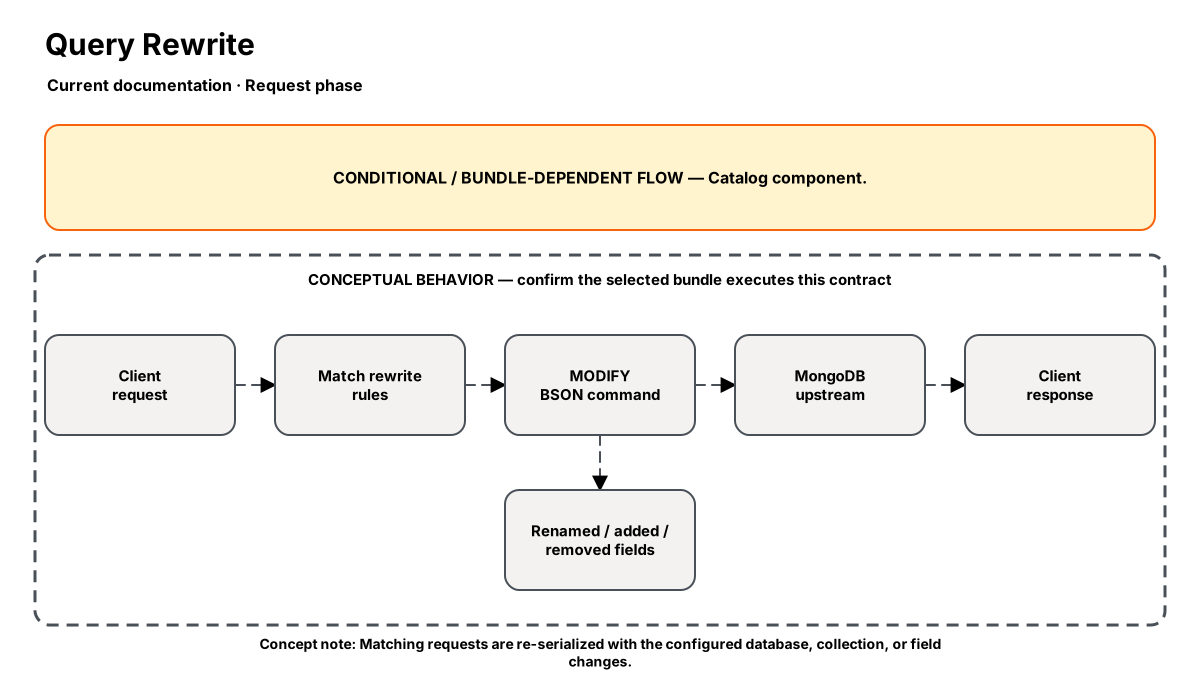
Release-aware feature flow. The diagram is explanatory; the release status on this page is authoritative.
Diagram resources: Open the SVG full screen · Download the editable Excalidraw source
Performance impact
:::warning Unverified performance figures
These figures are illustrative only. They are not current benchmarks or service guarantees and have not been verified by the current test suite.
:::
| Percentile | Reported figure |
|---|---|
| P50 | 0.10ms |
| P95 | 0.30ms |
| P99 | 0.60ms |
Note: BSON parse + field scan + re-serialize. Cost scales with document field count and number of rules.
Overview
The Query Rewrite step modifies MongoDB queries in-flight — renaming collections, databases, or field names. This enables transparent database migrations without application code changes.
Rules are evaluated in order. Each rule has a match condition (commands, databases, collections) and an action. Only enabled rules are applied.
When to use
- Renaming collections without updating application code
- Field name migrations (e.g., camelCase → snake_case)
- Redirecting queries to different databases during migration
- Removing deprecated fields from all operations
- Injecting fields into all commands (e.g., $maxTimeMS)
How it works
- Request phase: Parses the OP_MSG BSON body.
- Evaluates rules in order — each rule has a
matchcondition and anaction. - Match conditions:
commands(array),databases(array),collections(array). All specified conditions must match (AND logic). Empty = match all. - Actions:
rename_collection: Changes the collection name in the command (from→to)rename_database: Changes the$dbfield (from→to)rename_field: Renames a field key in the command body AND in subdocuments like$set,$unset,$inc,filter, etc. (from→to)add_field: Injects a new field with a JSON value (field+value)remove_field: Strips a field from the command (field)
- Re-serializes the modified BSON and forwards to the next step.
Configuration
“Not specified” means required semantics were not declared for that field.
| Field | Type | Default | Required | Description |
|---|---|---|---|---|
rules | json | — | Yes | Array of rewrite rules. Each rule: {name, enabled, match: {commands?, databases?, collections?}, action: {type, from?, to?, field?, value?}} |
Settings reference
No additional settings reference is documented for this component.
Examples
Rename collection (transparent migration)
steps:
  - name: builtin:query-rewrite
    config:
      rules:
        - name: migrate-users-collection
          enabled: true
          match:
            collections: ["legacy_users"]
          action:
            type: rename_collection
            from: legacy_users
            to: users
Rename database
steps:
  - name: builtin:query-rewrite
    config:
      rules:
        - name: redirect-old-app
          enabled: true
          match:
            databases: ["old_app"]
          action:
            type: rename_database
            from: old_app
            to: production
Rename field (schema migration)
steps:
  - name: builtin:query-rewrite
    config:
      rules:
        - name: rename-username-field
          enabled: true
          match: {}
          action:
            type: rename_field
            from: userName
            to: name

# This renames "userName" to "name" in all operations:
# - db.users.find({userName: "alice"})     → find({name: "alice"})
# - db.users.update({}, {$set: {userName: "bob"}}) → update({}, {$set: {name: "bob"}})
Combined: collection + field rename
steps:
  - name: builtin:query-rewrite
    config:
      rules:
        - name: rename-collection
          enabled: true
          match:
            collections: ["legacy_users"]
          action:
            type: rename_collection
            from: legacy_users
            to: users
        - name: rename-field
          enabled: true
          match: {}
          action:
            type: rename_field
            from: userName
            to: name
Best practices
- Test rewrite rules against your query patterns in staging first
- Use descriptive rule names — they appear in debug logs
- Set enabled: false to temporarily disable a rule without removing it
- Keep rules minimal — each rule adds parsing overhead
- For rename_field: the rename applies to the body document AND subdocuments ($set, $unset, $inc, filter, etc.)
Limitations
- Cannot rewrite operations that don't use OP_MSG (legacy OP_QUERY wire protocol)
- rename_field does not recurse into deeply nested subdocuments (only top-level and one level of known operators)
- Field renames in aggregation $project/$match stages are not automatically handled
Security and operational guidance
- Review authorization after namespace changes
- Validate query semantics and index usage
- Avoid ambiguous or cyclic rewrite rules
Related steps
Release availability
- Current documentation: Catalog component.
See the component catalog for the complete comparison matrix.