Query Rewrite
Rewrite eligible database names, collection names, or fields before forwarding a request.
This page belongs to the immutable 0.2.0 Private Preview documentation.
At a glance
| Property | Value |
|---|---|
| Pipeline phase | Request |
| Category | Transform |
| Canonical minimum tier | Pro |
| Legacy dashboard tier label | Business |
| Legacy rendered name | Query Rewrite |
| Legacy rendered summary | Transparently rewrite queries for collection renames, database renames, and field migrations. |
| Canonical entitlement | Yes |
| Supported deployment contract | Yes |
| Release status | Reconciled and executable. |
Release accuracy
- 0.2.0 Private Preview: Reconciled and executable.
The detailed material below preserves every section rendered by the legacy dashboard. Where it conflicts with the release status above, the release status is authoritative. Legacy field names and examples are not a substitute for the selected bundle's CRD and runtime contract. Unsafe legacy wording is retained in metadata for traceability but is corrected in the rendered guidance.
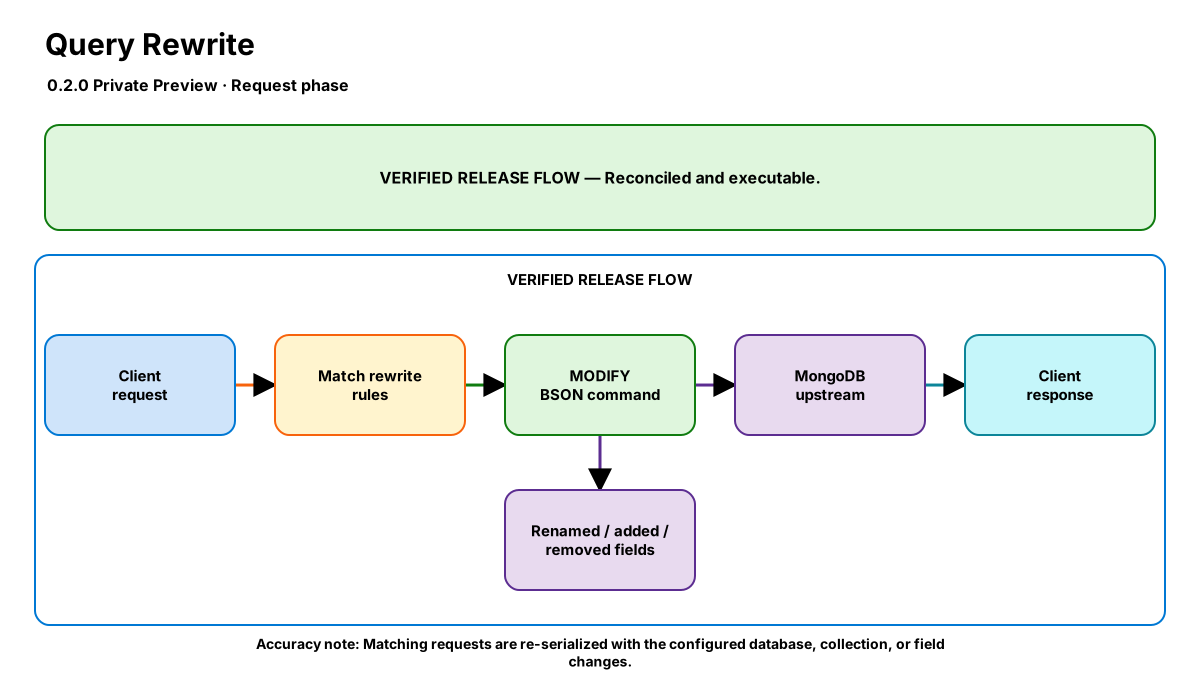
Release-aware feature flow. The diagram is explanatory; the release status on this page is authoritative.
Diagram resources: Open the SVG full screen · Download the editable Excalidraw source
Performance impact
:::warning Legacy, unverified performance claims
These numbers are preserved for documentation parity with the legacy dashboard. They are not current benchmarks or service guarantees and have not been verified by the current test suite.
:::
| Percentile | Legacy claim |
|---|---|
| P50 | 0.10ms |
| P95 | 0.30ms |
| P99 | 0.60ms |
Legacy note: BSON parse + field scan + re-serialize. Cost scales with document field count and number of rules.
Overview
The Query Rewrite step modifies MongoDB queries in-flight — renaming collections, databases, or field names. This enables transparent database migrations without application code changes.
Rules are evaluated in order. Each rule has a match condition (commands, databases, collections) and an action. Only enabled rules are applied.
When to use
- Renaming collections without updating application code
- Field name migrations (e.g., camelCase → snake_case)
- Redirecting queries to different databases during migration
- Removing deprecated fields from all operations
- Injecting fields into all commands (e.g., $maxTimeMS)
How it works
- Request phase: Parses the OP_MSG BSON body.
- Evaluates rules in order — each rule has a
matchcondition and anaction. - Match conditions:
commands(array),databases(array),collections(array). All specified conditions must match (AND logic). Empty = match all. - Actions:
rename_collection: Changes the collection name in the command (from→to)rename_database: Changes the$dbfield (from→to)rename_field: Renames a field key in the command body AND in subdocuments like$set,$unset,$inc,filter, etc. (from→to)add_field: Injects a new field with a JSON value (field+value)remove_field: Strips a field from the command (field)
- Re-serializes the modified BSON and forwards to the next step.
Configuration
The table preserves the legacy dashboard field reference. “Not specified” means the legacy source did not declare required semantics.
| Field | Legacy UI type | Legacy default | Required | Description |
|---|---|---|---|---|
rules | json | — | Yes | Array of rewrite rules. Each rule: {name, enabled, match: {commands?, databases?, collections?}, action: {type, from?, to?, field?, value?}} |
Settings reference
The legacy page did not render an additional anchored settings reference.
Examples
Rename collection (transparent migration)
steps:
  - name: builtin:query-rewrite
    config:
      rules:
        - name: migrate-users-collection
          enabled: true
          match:
            collections: ["legacy_users"]
          action:
            type: rename_collection
            from: legacy_users
            to: users
Rename database
steps:
  - name: builtin:query-rewrite
    config:
      rules:
        - name: redirect-old-app
          enabled: true
          match:
            databases: ["old_app"]
          action:
            type: rename_database
            from: old_app
            to: production
Rename field (schema migration)
steps:
  - name: builtin:query-rewrite
    config:
      rules:
        - name: rename-username-field
          enabled: true
          match: {}
          action:
            type: rename_field
            from: userName
            to: name

# This renames "userName" to "name" in all operations:
# - db.users.find({userName: "alice"})     → find({name: "alice"})
# - db.users.update({}, {$set: {userName: "bob"}}) → update({}, {$set: {name: "bob"}})
Combined: collection + field rename
steps:
  - name: builtin:query-rewrite
    config:
      rules:
        - name: rename-collection
          enabled: true
          match:
            collections: ["legacy_users"]
          action:
            type: rename_collection
            from: legacy_users
            to: users
        - name: rename-field
          enabled: true
          match: {}
          action:
            type: rename_field
            from: userName
            to: name
Best practices
- Test rewrite rules against your query patterns in staging first
- Use descriptive rule names — they appear in debug logs
- Set enabled: false to temporarily disable a rule without removing it
- Keep rules minimal — each rule adds parsing overhead
- For rename_field: the rename applies to the body document AND subdocuments ($set, $unset, $inc, filter, etc.)
Limitations
- Cannot rewrite operations that don't use OP_MSG (legacy OP_QUERY wire protocol)
- rename_field does not recurse into deeply nested subdocuments (only top-level and one level of known operators)
- Field renames in aggregation $project/$match stages are not automatically handled
Security and operational guidance
- Review authorization after namespace changes
- Validate query semantics and index usage
- Avoid ambiguous or cyclic rewrite rules
Related steps
Release availability
- 0.2.0 Private Preview: Reconciled and executable.
See the component catalog for the complete comparison matrix.