Query Replay
Status: Unsupported in 0.2.0: dashboard manifest only. No canonical entitlement and no supported deployment contract.
:::danger Unsupported legacy concept
This page preserves a legacy dashboard concept. It has no canonical entitlement and no supported deployment contract. Do not infer a CRD, Operator reconciliation path, runtime implementation, or support commitment from the historical configuration and examples below.
:::
This page belongs to the immutable 0.2.0 Private Preview documentation.
At a glance
| Property | Value |
|---|---|
| Pipeline phase | Request + Response |
| Category | Testing |
| Canonical minimum tier | No canonical entitlement |
| Legacy dashboard tier label | Enterprise |
| Legacy rendered name | Query Replay |
| Legacy rendered summary | Record production traffic and replay against new clusters for migration validation. |
| Canonical entitlement | No |
| Supported deployment contract | No |
| Release status | Unsupported in 0.2.0: dashboard manifest only. No canonical entitlement and no supported deployment contract. |
Release accuracy
- 0.2.0 Private Preview: Unsupported in 0.2.0: dashboard manifest only. No canonical entitlement and no supported deployment contract.
The detailed material below preserves every section rendered by the legacy dashboard. Where it conflicts with the release status above, the release status is authoritative. Legacy field names and examples are not a substitute for the selected bundle's CRD and runtime contract. Unsafe legacy wording is retained in metadata for traceability but is corrected in the rendered guidance.
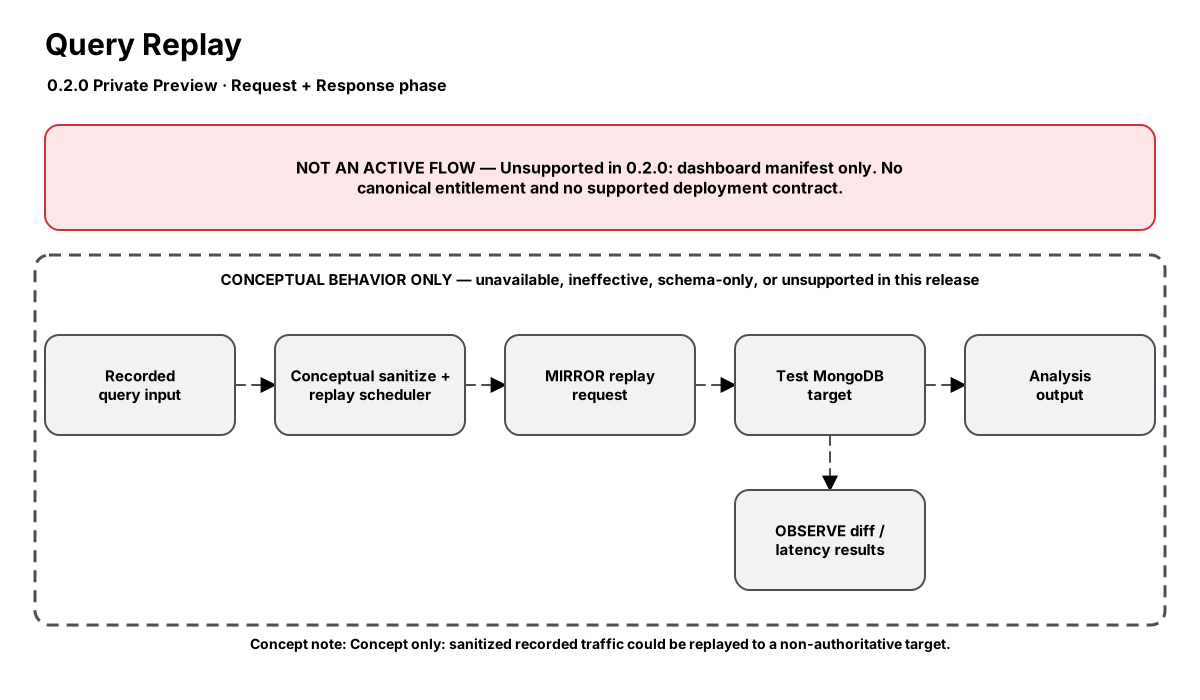
Release-aware feature flow. The diagram is explanatory; the release status on this page is authoritative.
Diagram resources: Open the SVG full screen · Download the editable Excalidraw source
Performance impact
:::warning Legacy, unverified performance claims
These numbers are preserved for documentation parity with the legacy dashboard. They are not current benchmarks or service guarantees and have not been verified by the current test suite.
:::
| Percentile | Legacy claim |
|---|---|
| P50 | <0.3ms |
| P95 | <1ms |
| P99 | <2ms |
Legacy note: Recording is async — minimal impact on live traffic
Overview
The Query Replay step captures live MongoDB traffic (queries and responses) and can replay it against a different cluster at configurable speed. This is essential for validating MongoDB version upgrades, schema changes, or hardware migrations.
In compare mode, it simultaneously records and replays, then diffs the responses to detect behavioral differences between the two clusters.
When to use
- Validating MongoDB version upgrades (e.g., 5.0 → 7.0) with real traffic
- Testing schema changes against production query patterns
- Load testing new hardware with realistic workloads
- Reproducing production issues in staging environments
How it works
- Record mode: captures all (or sampled) request/response pairs to storage
- Replay mode: reads recordings and sends them to replay_target at configured speed
- Compare mode: records live traffic, replays in parallel, diffs responses
- Diff report shows: different result counts, missing documents, new errors
- Recording includes timestamps for realistic replay pacing
Configuration
The table preserves the legacy dashboard field reference. “Not specified” means the legacy source did not declare required semantics.
| Field | Legacy UI type | Legacy default | Required | Description |
|---|---|---|---|---|
mode | select | record | Not specified | record, replay, or compare |
storage | select | file | Not specified | Where to store recordings |
file_path | string | — | Not specified | Storage path for recordings |
replay_target | string | — | Not specified | Target cluster for replay |
sample_rate | percentage | 100 | Not specified | Percentage of traffic to record |
compare_fields | json | — | Not specified | Response aspects to diff |
max_recording_size | string | 10GB | Not specified | Max recording size |
speed_multiplier | number | 1 | Not specified | Replay speed (1x = realtime) |
Settings reference
The legacy page did not render an additional anchored settings reference.
Examples
MongoDB upgrade validation
steps:
  - id: builtin:query-replay
    config:
      mode: compare
      storage: s3
      file_path: s3://nexo-recordings/upgrade-test/
      replay_target: mongo-v7-staging:27017
      sample_rate: 100
      speed_multiplier: 1
      compare_fields:
        - result_count
        - document_ids
        - error_code
        - sort_order
Best practices
- Record during peak traffic hours for realistic load testing
- Use compare mode for upgrade validation — replay alone misses behavioral changes
- Set max_recording_size to avoid filling disk during extended recordings
- Replay at 2-10x speed to compress testing timelines
Limitations
- Write operations are replayed but may fail due to unique constraints (expected)
- Sessions and transactions may not replay correctly (ordering dependencies)
- Large binary fields (GridFS) significantly increase recording size
- Compare mode doubles proxy resource usage (processing two response streams)
Security and operational guidance
- This is a legacy dashboard concept, not a canonically entitled Nexo component.
- No supported deployment contract, CRD mapping, Operator reconciliation path, or runtime execution guarantee is published.
- Treat every configuration example and performance number below as historical design material only.
Related steps
Release availability
- 0.2.0 Private Preview: Unsupported in 0.2.0: dashboard manifest only. No canonical entitlement and no supported deployment contract.
See the component catalog for the complete comparison matrix.