Query Guard
Status: Unavailable: NexoQueryGuard is schema-only in the pinned Operator.
:::caution No supported deployment contract
This capability is documented for catalog completeness, but the selected release does not publish a supported end-to-end deployment contract.
:::
This page belongs to the immutable 0.2.0 Private Preview documentation.
At a glance
| Property | Value |
|---|---|
| Pipeline phase | Request |
| Category | Performance |
| Canonical minimum tier | Free |
| Legacy dashboard tier label | Free |
| Legacy rendered name | Query Guard |
| Legacy rendered summary | Request-phase budgets, shape guardrails, and static cost controls for MongoDB queries. |
| Canonical entitlement | Yes |
| Supported deployment contract | No |
| Release status | Unavailable: NexoQueryGuard is schema-only in the pinned Operator. |
Release accuracy
- 0.2.0 Private Preview: Unavailable: NexoQueryGuard is schema-only in the pinned Operator.
The detailed material below preserves every section rendered by the legacy dashboard. Where it conflicts with the release status above, the release status is authoritative. Legacy field names and examples are not a substitute for the selected bundle's CRD and runtime contract. Unsafe legacy wording is retained in metadata for traceability but is corrected in the rendered guidance.
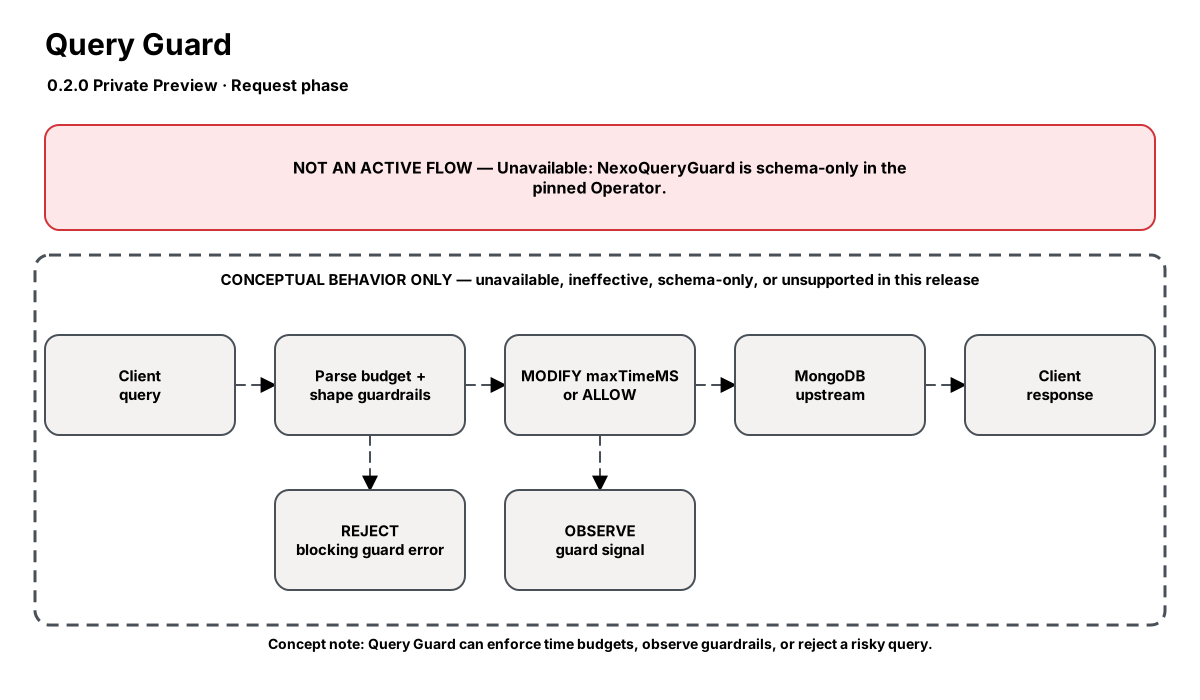
Release-aware feature flow. The diagram is explanatory; the release status on this page is authoritative.
Diagram resources: Open the SVG full screen · Download the editable Excalidraw source
Performance impact
:::warning Legacy, unverified performance claims
These numbers are preserved for documentation parity with the legacy dashboard. They are not current benchmarks or service guarantees and have not been verified by the current test suite.
:::
| Percentile | Legacy claim |
|---|---|
| P50 | <0.05ms |
| P95 | <0.1ms |
| P99 | <0.2ms |
Legacy note: Single BSON parse/mutate on the request path only
Overview
Query Guard is implemented as the builtin:query-guard proxy runtime step. It inspects supported MongoDB OP_MSG commands before they are forwarded upstream, applies maxTimeMS budgets, and can observe or block query shapes that are missing required predicates or exceed a static cost score.
Start with Quick protection: a single timeout budget plus Observe/Enforce. Add command budgets, collection rules, tenant-predicate requirements, forbidden operators, and cost presets as your rollout matures.
When to use
- Protecting shared clusters from runaway finds, aggregations, and sorts
- Adding maxTimeMS to legacy services without changing application code
- Enforcing stricter budgets on hot namespaces such as sessions or carts
- Requiring tenant predicates on multi-tenant collections
- Observing or blocking expensive query shapes with static heuristics
How it works
- Parse the outgoing OP_MSG command body
- Check whether the command is in the guarded command allow-list
- Resolve the effective maxTimeMS from collection rules, command budgets, or the global default
- Respect, override, or minimize any existing application-provided maxTimeMS
- Evaluate enabled shape and cost guardrails in observe or block mode
- Forward the mutated request or return a MongoDB error when a blocking guard fires
Configuration
The table preserves the legacy dashboard field reference. “Not specified” means the legacy source did not declare required semantics.
| Field | Legacy UI type | Legacy default | Required | Description |
|---|---|---|---|---|
enabled | boolean | true | Not specified | Soft toggle for the guard |
defaultMaxTimeMS | number | 5000 | Not specified | Global fallback budget in milliseconds |
existingPolicy | select | respect | Not specified | How to handle an application-provided maxTimeMS |
commands | json | [find, aggregate, count, distinct, findAndModify, listCollections, listIndexes] | Not specified | Supported commands to guard |
collectionRules | json | — | Not specified | Pro: namespace rules with maxTimeMS, commands, policy, and priority |
commandBudgets | json | — | Not specified | Pro: per-command maxTimeMS overrides |
commandPolicies | json | — | Not specified | Pro: per-command respect/override/minimum policy; overrides existingPolicy for that command’s effective budget (per-command or default) (blank = inherit global) |
dryRun | boolean | false | Not specified | Pro: log and measure decisions without mutating requests |
shape.enabled | boolean | false | Not specified | Growth: observe required predicates and forbidden operators |
shape.mode | select | observe | Not specified | Business for block mode; observe is Growth |
shape.requiredPredicates | json | — | Not specified | Fields that must appear globally unless scoped by namespaceRules |
shape.namespaceRules | string | — | Not specified | Lines such as app.* -> require tenantId, orgId |
shape.forbiddenOperators | json | [$where] | Not specified | Operators that shape guardrails observe or block |
cost.enabled | boolean | false | Not specified | Growth: enable static query cost controls |
cost.action | select | observe | Not specified | Business for block mode; observe is Growth |
cost.scoreThreshold | number | 75 | Not specified | Cost score threshold; use Lenient/Balanced/Strict presets when possible |
cost.highCostOperators | json | [$where, $regex, $lookup, noLimitSort] | Not specified | Signals that add points to the cost score |
Settings reference
Quick protection
The simplest way to protect a cluster: pick a single timeout budget (defaultMaxTimeMS) and choose Observe (log only) or Enforce (apply the budget). Presets seed sensible values; the Safe default preset works on every tier, while OLTP/Analytics/Strict presets and Observe-only dry-run require Pro. Everything below is optional, progressive tuning.
Timeout budget policy
Controls what happens when the application already sets its own maxTimeMS. Respect keeps the app value (default). Override always uses the Nexo budget. Minimum uses the smaller of the two, acting as a stricter upper bound. Override and Minimum require Pro. Guarded commands (the MongoDB commands the budget applies to) are editable on all tiers here.
Per-command budgets
Pro: override the default timeout for individual commands — e.g. a tight 1s budget for find but 30s for aggregate reporting queries. Leave a command blank to fall back to the default budget. Each command also has an optional Policy override (respect/override/minimum) that controls how that command treats an app-provided maxTimeMS; it applies to the command’s effective budget whether or not you set a per-command budget. Leave it on Default to inherit the global Timeout budget policy. Choose which commands are guarded under Timeout budget policy.
Collection rules
Pro: apply namespace-specific budgets with priority ordering. Target hot namespaces (e.g. app.sessions or app.carts) with tighter budgets than the global default. Rules are matched by glob and the highest-priority match wins.
Query shape guardrails
Growth (Observe) / Business (Block): require certain predicates (e.g. tenantId) to be present on queries, and observe or block dangerous operators such as $where. Use namespace rules to require predicates only on specific collections. Start in Observe to measure impact before enabling Block.
Cost controls
Growth (Observe) / Business (Block): score each query against a static heuristic ($where, unanchored $regex, $lookup, unbounded full scans, sort-without-limit) and observe or block when the score exceeds a threshold. Use the Lenient (90), Balanced (75), or Strict (50) presets instead of hand-tuning the raw threshold.
Review
Summarizes the effective policy, shows which settings are locked by your current tier, and provides a JSON preview of the configuration that will be persisted to the pipeline.
Examples
Global default with stricter order budget
steps:
  - id: builtin:query-guard
    config:
      enabled: true
      defaultMaxTimeMS: 5000
      existingPolicy: minimum
      collectionRules:
        - name: hot-orders
          namespaces: [app.orders]
          commands: [find, aggregate]
          maxTimeMS: 750
          priority: 1
Best practices
- Start with respect mode to avoid surprising applications that already set maxTimeMS
- Use minimum mode when you want proxy budgets to act as a stricter upper bound
- Keep the command allow-list explicit instead of mutating every command type
- Roll out Pro collection rules in dry-run first for safer production adoption
- Use observe mode for shape and cost guardrails before enabling block mode
Limitations
- Only applies to supported OP_MSG commands
- Cost controls use a static heuristic; use Index Advisor for background explain analysis
- Dry-run, namespace, and command-specific overrides require Pro tier
- Shape and cost observe require Growth; block mode requires Business
Security and operational guidance
- Start with observation or conservative budgets
- Coordinate timeouts with application retry behavior
- Query Size Limit shares its commercial entitlement but remains a separate selectable compatibility component
Related steps
Release availability
- 0.2.0 Private Preview: Unavailable: NexoQueryGuard is schema-only in the pinned Operator.
See the component catalog for the complete comparison matrix.