PII Masking
Redact configured fields and recognized sensitive patterns from MongoDB response documents.
This page belongs to the immutable 0.2.0 Private Preview documentation.
At a glance
| Property | Value |
|---|---|
| Pipeline phase | Response |
| Category | Compliance |
| Canonical minimum tier | Pro |
| Legacy dashboard tier label | Business |
| Legacy rendered name | PII Masking |
| Legacy rendered summary | Automatically redact sensitive fields in query responses based on user role. |
| Canonical entitlement | Yes |
| Supported deployment contract | Yes |
| Release status | Reconciled and executable. |
Release accuracy
- 0.2.0 Private Preview: Reconciled and executable.
The detailed material below preserves every section rendered by the legacy dashboard. Where it conflicts with the release status above, the release status is authoritative. Legacy field names and examples are not a substitute for the selected bundle's CRD and runtime contract. Unsafe legacy wording is retained in metadata for traceability but is corrected in the rendered guidance.
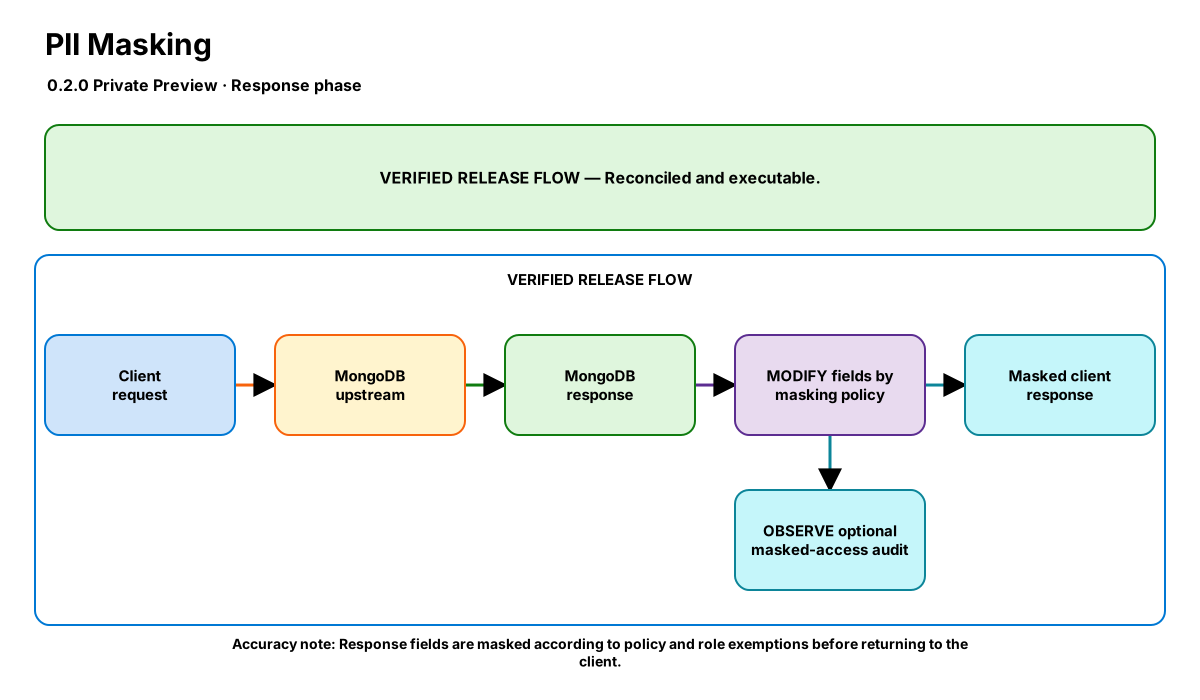
Release-aware feature flow. The diagram is explanatory; the release status on this page is authoritative.
Diagram resources: Open the SVG full screen · Download the editable Excalidraw source
Performance impact
:::warning Legacy, unverified performance claims
These numbers are preserved for documentation parity with the legacy dashboard. They are not current benchmarks or service guarantees and have not been verified by the current test suite.
:::
| Percentile | Legacy claim |
|---|---|
| P50 | <0.5ms |
| P95 | <1ms |
| P99 | <2ms |
Legacy note: Linear scan of response fields — heavier for large documents
Overview
The PII Masking step intercepts MongoDB responses and redacts sensitive fields (SSN, email, credit card, phone numbers) before they reach the client. Masking rules are role-aware — admin users can see full values while regular users see masked versions.
This provides GDPR/HIPAA/PCI compliance at the infrastructure level without requiring application code changes. The step supports both explicit field targeting and automatic pattern detection.
When to use
- GDPR compliance — minimizing PII exposure to non-privileged users
- PCI-DSS — masking credit card numbers outside of payment processing
- HIPAA — protecting PHI from unauthorized access
- Multi-tenant applications where support staff should not see customer PII
How it works
- Response document is received from MongoDB
- Each field is checked against masking rules (explicit names or auto-detect patterns)
- User's role is determined from auth context (MongoDB user, header, or cert CN)
- If user's role is not in roles_exempt, field value is replaced with masked pattern
- Masked access is optionally logged for audit trail
Configuration
The table preserves the legacy dashboard field reference. “Not specified” means the legacy source did not declare required semantics.
| Field | Legacy UI type | Legacy default | Required | Description |
|---|---|---|---|---|
rules | json | — | Not specified | Masking rules: {field, pattern, roles_exempt} |
detection_mode | select | explicit | Not specified | explicit = named fields; auto = regex detection |
auto_patterns | json | — | Not specified | Regex patterns for auto-detection |
role_source | select | auth_user | Not specified | How to determine user role |
log_masked_access | boolean | true | Not specified | Audit log masked field access |
failure_policy | select | fail_closed | Not specified | fail_closed (default) blocks the response if it cannot be parsed/re-serialized in a masked namespace; fail_open logs and returns the UNMASKED response |
Settings reference
The legacy page did not render an additional anchored settings reference.
Examples
GDPR compliance
steps:
  - id: builtin:pii-masking
    config:
      detection_mode: explicit
      role_source: auth_user
      log_masked_access: true
      rules:
        - field: email
          pattern: "{first2}***@***"
          roles_exempt: [admin, dpo]
        - field: phone
          pattern: "***-***-{last4}"
          roles_exempt: [admin]
        - field: ssn
          pattern: "***-**-{last4}"
          roles_exempt: []
Best practices
- Start with explicit mode — auto-detection can have false positives
- Never exempt all roles from credit card masking (PCI requirement)
- Enable log_masked_access for compliance audit trails
- Keep failure_policy: fail_closed in production so a malformed response can never leak unmasked PII
- Pair with audit step for complete access logging
Limitations
- Nested fields require dot-notation in rules (e.g., "address.street")
- Auto-detection adds ~1ms per document due to regex matching
- Cannot mask fields inside arrays of primitives (only objects)
Security and operational guidance
- Use fail closed for protected namespaces
- Test nested BSON and unsupported values
- Fail open can return unmasked data when processing fails
Related steps
Release availability
- 0.2.0 Private Preview: Reconciled and executable.
See the component catalog for the complete comparison matrix.