Intelligent Failover
Status: Unsupported in 0.2.0: dashboard manifest only. No canonical entitlement and no supported deployment contract.
:::danger Unsupported legacy concept
This page preserves a legacy dashboard concept. It has no canonical entitlement and no supported deployment contract. Do not infer a CRD, Operator reconciliation path, runtime implementation, or support commitment from the historical configuration and examples below.
:::
This page belongs to the immutable 0.2.0 Private Preview documentation.
At a glance
| Property | Value |
|---|---|
| Pipeline phase | Router + Response |
| Category | Resilience |
| Canonical minimum tier | No canonical entitlement |
| Legacy dashboard tier label | Enterprise |
| Legacy rendered name | Intelligent Failover |
| Legacy rendered summary | Multi-cluster active-active failover with health scoring and automatic traffic shift. |
| Canonical entitlement | No |
| Supported deployment contract | No |
| Release status | Unsupported in 0.2.0: dashboard manifest only. No canonical entitlement and no supported deployment contract. |
Release accuracy
- 0.2.0 Private Preview: Unsupported in 0.2.0: dashboard manifest only. No canonical entitlement and no supported deployment contract.
The detailed material below preserves every section rendered by the legacy dashboard. Where it conflicts with the release status above, the release status is authoritative. Legacy field names and examples are not a substitute for the selected bundle's CRD and runtime contract. Unsafe legacy wording is retained in metadata for traceability but is corrected in the rendered guidance.
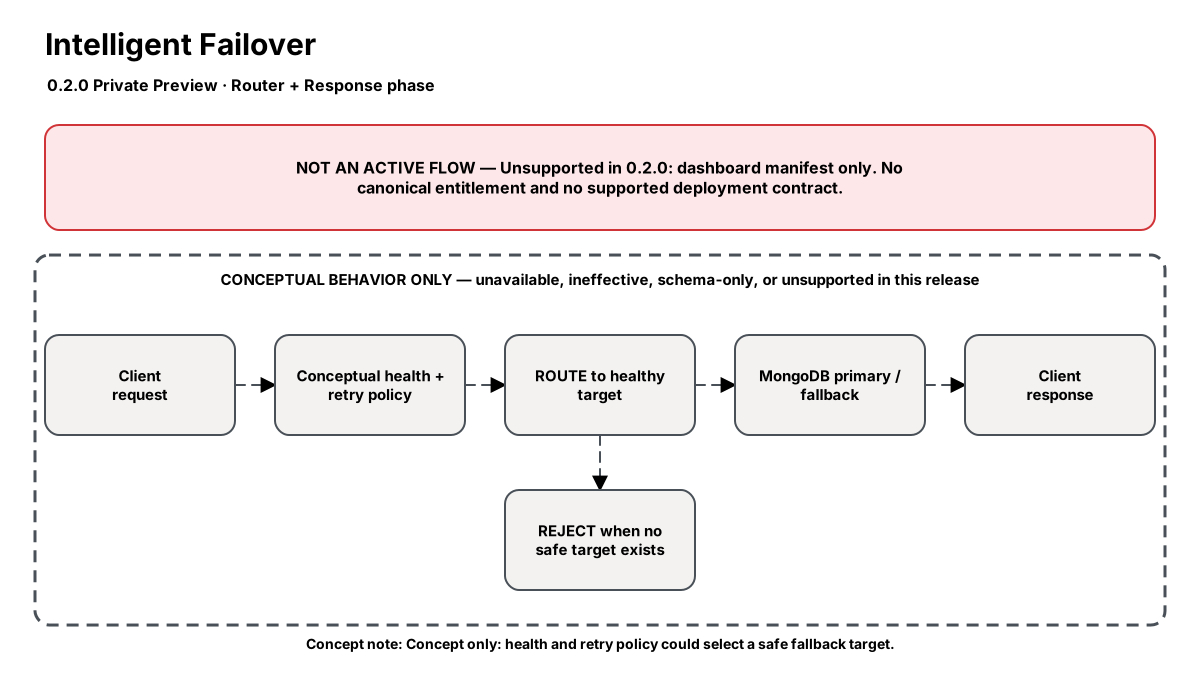
Release-aware feature flow. The diagram is explanatory; the release status on this page is authoritative.
Diagram resources: Open the SVG full screen · Download the editable Excalidraw source
Performance impact
:::warning Legacy, unverified performance claims
These numbers are preserved for documentation parity with the legacy dashboard. They are not current benchmarks or service guarantees and have not been verified by the current test suite.
:::
| Percentile | Legacy claim |
|---|---|
| P50 | <0.1ms |
| P95 | <0.2ms |
| P99 | <0.3ms |
Legacy note: Health checks are background — zero overhead on queries
Overview
The Intelligent Failover step continuously monitors multiple MongoDB clusters using latency probes, error rate tracking, and health scores. When a cluster degrades (high latency or elevated error rates), traffic is automatically shifted to healthy clusters.
Unlike MongoDB's built-in replica set failover (which only works within a single cluster), this provides cross-cluster, cross-region disaster recovery with configurable failover behavior.
When to use
- Multi-region disaster recovery without manual intervention
- Active-active deployments where both regions serve traffic
- Protecting against cloud provider regional outages
- Achieving >99.99% availability SLAs
How it works
- Health checks probe each cluster at configured intervals
- Each cluster gets a health score based on latency + error rate
- Traffic is weighted by health score (healthier clusters get more traffic)
- If a cluster exceeds unhealthy_threshold consecutive failures, it's removed
- In gradual mode, traffic shifts over 30s to avoid thundering herd
- When failed cluster recovers, auto-failback gradually restores original routing
Configuration
The table preserves the legacy dashboard field reference. “Not specified” means the legacy source did not declare required semantics.
| Field | Legacy UI type | Legacy default | Required | Description |
|---|---|---|---|---|
clusters | json | — | Not specified | Cluster pool: {name, address, priority} |
health_check_interval | duration | 5s | Not specified | Probe frequency |
unhealthy_threshold | number | 3 | Not specified | Failures before marking unhealthy |
healthy_threshold | number | 2 | Not specified | Successes before marking healthy |
latency_threshold_ms | number | 500 | Not specified | Degraded latency threshold |
error_rate_threshold | percentage | 5 | Not specified | Error rate marking unhealthy |
failover_mode | select | gradual | Not specified | Gradual (30s shift) or immediate |
failback_enabled | boolean | true | Not specified | Auto-return traffic on recovery |
webhook_url | string | — | Not specified | Notify on failover events |
Settings reference
The legacy page did not render an additional anchored settings reference.
Examples
Active-active with gradual failover
steps:
  - id: builtin:intelligent-failover
    config:
      failover_mode: gradual
      failback_enabled: true
      health_check_interval: 3s
      unhealthy_threshold: 3
      latency_threshold_ms: 300
      error_rate_threshold: 2
      webhook_url: https://hooks.slack.com/services/xxx
      clusters:
        - name: us-east-primary
          address: mongo-us-east:27017
          priority: 100
        - name: eu-west-dr
          address: mongo-eu-west:27017
          priority: 80
        - name: apac-dr
          address: mongo-apac:27017
          priority: 60
Best practices
- Use gradual failover to prevent thundering herd on DR cluster
- Set latency_threshold based on your p99 SLA (e.g., if SLA is 200ms, threshold at 150ms)
- Always configure webhook for ops visibility into failover events
- Test failover monthly by artificially degrading the primary cluster
Limitations
- Write conflicts possible in active-active mode (last-writer-wins)
- Failover latency is health_check_interval × unhealthy_threshold at minimum
- Does not sync data between clusters — requires separate replication setup
- Maximum 5 clusters in the pool (health check overhead)
Security and operational guidance
- This is a legacy dashboard concept, not a canonically entitled Nexo component.
- No supported deployment contract, CRD mapping, Operator reconciliation path, or runtime execution guarantee is published.
- Treat every configuration example and performance number below as historical design material only.
Related steps
Release availability
- 0.2.0 Private Preview: Unsupported in 0.2.0: dashboard manifest only. No canonical entitlement and no supported deployment contract.
See the component catalog for the complete comparison matrix.