Audit Log
Record policy and access events for investigations and compliance workflows.
This page belongs to the immutable 0.2.0 Private Preview documentation.
At a glance
| Property | Value |
|---|---|
| Pipeline phase | Request + response |
| Category | Security |
| Canonical minimum tier | Pro |
| Legacy dashboard tier label | Business |
| Legacy rendered name | Audit Logging |
| Legacy rendered summary | Structured audit logs with optional Pro integrity/redaction controls and Business compliance presets. |
| Canonical entitlement | Yes |
| Supported deployment contract | Yes |
| Release status | Reconciled and executable. |
Release accuracy
- 0.2.0 Private Preview: Reconciled and executable.
The detailed material below preserves every section rendered by the legacy dashboard. Where it conflicts with the release status above, the release status is authoritative. Legacy field names and examples are not a substitute for the selected bundle's CRD and runtime contract. Unsafe legacy wording is retained in metadata for traceability but is corrected in the rendered guidance.
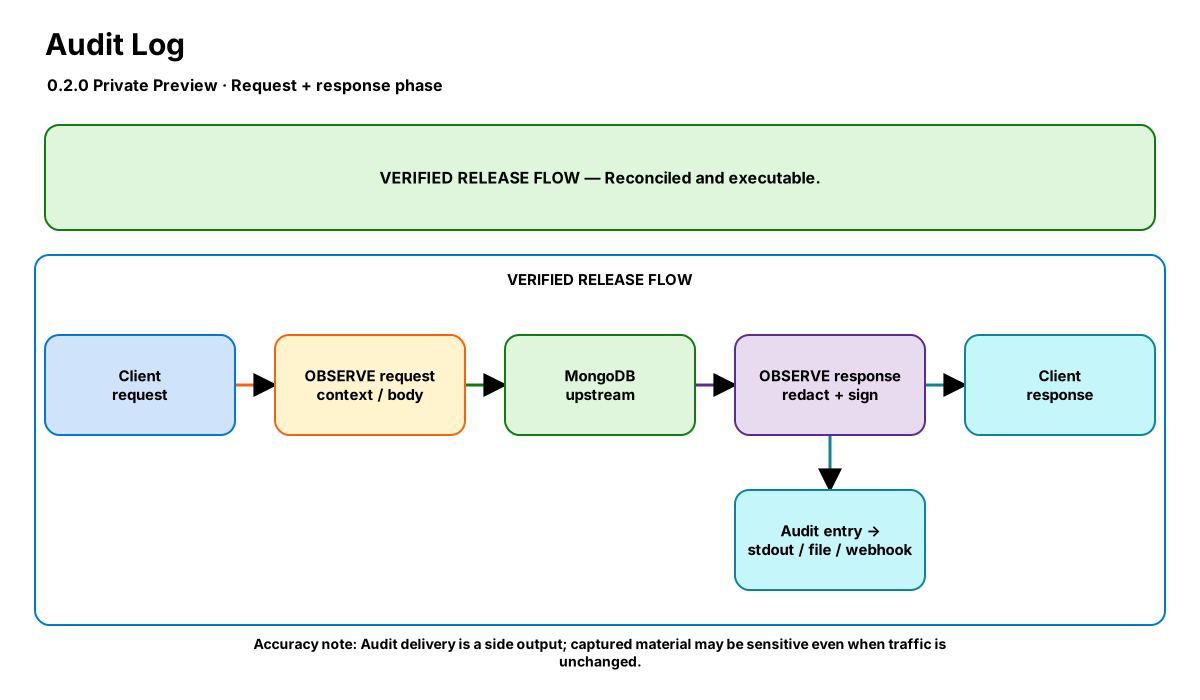
Release-aware feature flow. The diagram is explanatory; the release status on this page is authoritative.
Diagram resources: Open the SVG full screen · Download the editable Excalidraw source
Performance impact
:::warning Legacy, unverified performance claims
These numbers are preserved for documentation parity with the legacy dashboard. They are not current benchmarks or service guarantees and have not been verified by the current test suite.
:::
| Percentile | Legacy claim |
|---|---|
| P50 | 0.10ms |
| P95 | 0.40ms |
| P99 | 0.90ms |
Legacy note: Buffered mode amortizes writes; HMAC signing and redaction add small per-entry overhead.
Overview
The Audit Logging step records MongoDB requests and responses as JSON entries. It supports stdout/file/both output, async buffered writes, webhook shipping, request-body capture, and command allow/deny filters.
Pro tier adds HMAC-SHA256 entry signing and field-level redaction. Business tier adds compliance templates (SOC2, HIPAA, GDPR) plus file retention/rotation controls.
When to use
- Compliance evidence for administrative, access, or data lifecycle operations
- Forensic request tracing with request/response metadata and latency
- Protecting logged payloads with redaction while preserving auditability
- Managing local audit files with size and age limits
How it works
- Request phase: the step checks filter_commands/exclude_commands, stores request size and start time, and optionally captures the OP_MSG command body.
- Redaction: when redaction.enabled is true (Pro), matching field names in the captured body are replaced with REDACTED before the entry is stored.
- Response phase: the step records response size, duration, success/error state, and tenant metadata, then emits one JSON audit entry.
- Integrity: when hmac_signing.enabled is true (Pro), the entry is signed with HMAC-SHA256 and the hex signature is written in the signature field.
- Delivery and retention: entries are written to stdout, a file, both, and/or a webhook. Business retention can rotate oversized files and purge rotated files older than max_days.
Configuration
The table preserves the legacy dashboard field reference. “Not specified” means the legacy source did not declare required semantics.
| Field | Legacy UI type | Legacy default | Required | Description |
|---|---|---|---|---|
output | string | — | Yes | Destination for audit entries: stdout, file, or both |
file_path | string | — | No | Audit file path used when output is file or both |
include_body | bool | false | No | Capture the request OP_MSG body in each entry |
filter_commands | string[] | — | No | Only audit these commands; empty means audit everything except excludes |
exclude_commands | string[] | — | No | Commands that should never be logged |
buffer_size | number | 0 | No | Enable async buffering when greater than zero |
flush_interval_ms | number | 1000 | No | Flush interval for buffered writes |
webhook | object | — | No | { url, auth_token?, headers?, batch_size?, timeout_ms?, max_retries? } |
hmac_signing | object | — | No | { enabled: bool, secret: string } (Pro) |
redaction | object | — | No | { enabled: bool, fields: string[] } (Pro) |
compliance_template | string | — | No | Business preset: soc2, hipaa, or gdpr |
retention | object | — | No | { enabled: bool, max_days: number, max_size_mb: number } (Business) |
Settings reference
The legacy page did not render an additional anchored settings reference.
Examples
Pro tier signed and redacted audit log
steps:
  - name: builtin:audit
    config:
      output: both
      file_path: /var/log/nexo/audit.jsonl
      include_body: true
      exclude_commands: [isMaster, hello, ping]
      hmac_signing:
        enabled: true
        secret: ${AUDIT_HMAC_SECRET}
      redaction:
        enabled: true
        fields: [password, ssn, token]
Business HIPAA template with retention
steps:
  - name: builtin:audit
    config:
      output: file
      file_path: /var/log/nexo/hipaa-audit.jsonl
      compliance_template: hipaa
      retention:
        enabled: true
        max_days: 90
        max_size_mb: 250
      buffer_size: 1000
      flush_interval_ms: 1000
Best practices
- Use compliance_template for quick, opinionated command selection and then customize only if needed
- Enable include_body only when you need payload-level evidence, and pair it with redaction for sensitive fields
- Store HMAC secrets outside config files and inject them through secret management
- Use file retention only for local file outputs; pair webhook delivery with centralized immutable storage when possible
Limitations
- Only traffic that passes through the proxy is logged
- Redaction applies to captured request bodies, not arbitrary downstream log destinations
- Retention/rotation only applies to file-based audit output
Security and operational guidance
- HIPAA and GDPR presets enable full request-body capture in 0.2.0
- Do not enable those presets until explicit redaction, destination access, encryption, and retention controls are in place
- Audit bodies and metadata may contain regulated customer documents
- The preserved ${AUDIT_HMAC_SECRET} example is not runtime substitution syntax. Do not deploy it literally; supply a strong secret through the bundle-supported secret delivery mechanism.
Related steps
Release availability
- 0.2.0 Private Preview: Reconciled and executable.
See the component catalog for the complete comparison matrix.