Access Control
Status: Ineffective: the pinned Operator renders legacy Filter fields that do not match the Proxy contract. Do not rely on it as a security boundary.
:::caution No supported deployment contract
This capability is documented for catalog completeness, but the selected release does not publish a supported end-to-end deployment contract.
:::
This page belongs to the immutable 0.2.0 Private Preview documentation.
At a glance
| Property | Value |
|---|---|
| Pipeline phase | Request |
| Category | Security |
| Canonical minimum tier | Free |
| Legacy dashboard tier label | Pro |
| Legacy rendered name | Access Control |
| Legacy rendered summary | Allow or deny specific MongoDB commands, databases, or collections at the proxy layer. |
| Canonical entitlement | Yes |
| Supported deployment contract | No |
| Release status | Ineffective: the pinned Operator renders legacy Filter fields that do not match the Proxy contract. Do not rely on it as a security boundary. |
Release accuracy
- 0.2.0 Private Preview: Ineffective: the pinned Operator renders legacy Filter fields that do not match the Proxy contract. Do not rely on it as a security boundary.
The detailed material below preserves every section rendered by the legacy dashboard. Where it conflicts with the release status above, the release status is authoritative. Legacy field names and examples are not a substitute for the selected bundle's CRD and runtime contract. Unsafe legacy wording is retained in metadata for traceability but is corrected in the rendered guidance.
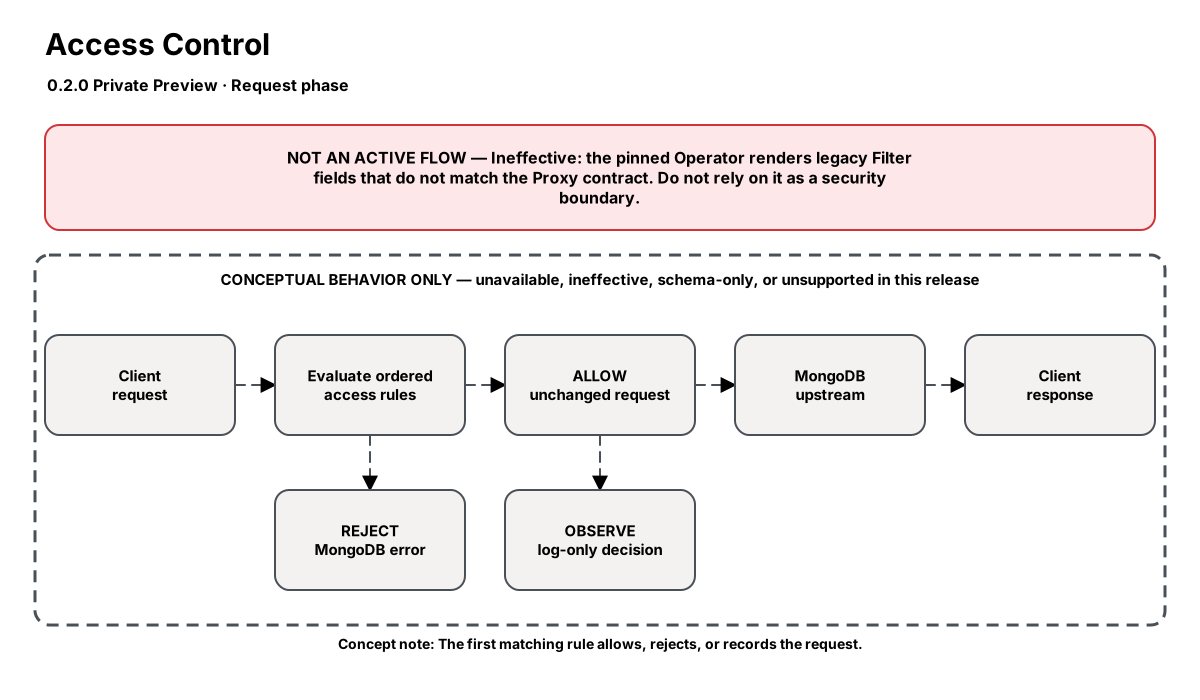
Release-aware feature flow. The diagram is explanatory; the release status on this page is authoritative.
Diagram resources: Open the SVG full screen · Download the editable Excalidraw source
Performance impact
:::warning Legacy, unverified performance claims
These numbers are preserved for documentation parity with the legacy dashboard. They are not current benchmarks or service guarantees and have not been verified by the current test suite.
:::
| Percentile | Legacy claim |
|---|---|
| P50 | 0.03ms |
| P95 | 0.08ms |
| P99 | 0.15ms |
Legacy note: Linear scan over rules (typically <10 rules). Effectively O(1) for most deployments.
Overview
The Access Control step enforces fine-grained rules over which MongoDB operations are permitted through the proxy. Rules are evaluated in order — the first matching rule wins. Each rule can target specific commands, databases, or collections and either allow, deny, or log the operation.
Rules can be scoped per database, per collection, or globally. This gives infrastructure teams the ability to enforce guardrails without modifying application code. Denied operations receive a synthetic error response with a configurable message.
When to use
- Blocking dangerous operations (drop, dropDatabase, killOp) in production
- Restricting dev teams to read-only access through the proxy
- Preventing accidental schema changes (createIndex in production)
- Enforcing least-privilege access patterns for multi-tenant deployments
- Locking down access to system databases (admin, config, local)
How it works
- Request phase: Extracts the command name and target database from the OP_MSG.
- Evaluates rules in order — first matching rule determines the action.
- Each rule can match on:
commands(array),database(string),collections(glob array),client_addrs(CIDR). - Actions:
deny(returns error, short-circuits),allow(passes through),log_only(logs and passes through). - If no rule matches,
default_actionapplies (typically "allow").
Configuration
The table preserves the legacy dashboard field reference. “Not specified” means the legacy source did not declare required semantics.
| Field | Legacy UI type | Legacy default | Required | Description |
|---|---|---|---|---|
rules | json | — | Yes | Ordered array of rules. Each rule: {commands?, database?, collections?, client_addrs?, action, error_message?} |
default_action | select | allow | Yes | Action when no rule matches: "allow" or "deny" |
Settings reference
The legacy page did not render an additional anchored settings reference.
Examples
Block destructive commands
steps:
  - name: builtin:filter
    config:
      default_action: allow
      rules:
        - commands: ["drop", "dropDatabase", "killOp", "shutdown"]
          action: deny
          error_message: "Destructive commands are blocked by policy"
Lock down system databases
steps:
  - name: builtin:filter
    config:
      default_action: allow
      rules:
        - database: admin
          action: deny
          error_message: "Admin database access is restricted"
        - database: config
          action: deny
          error_message: "Config database access is restricted"
        - database: local
          action: deny
          error_message: "Local database access is restricted"
Read-only access (allowlist)
steps:
  - name: builtin:filter
    config:
      default_action: deny
      rules:
        - commands: ["find", "aggregate", "count", "distinct", "getMore", "listCollections", "listDatabases"]
          action: allow
Combined: block drops + restrict databases
steps:
  - name: builtin:filter
    config:
      default_action: allow
      rules:
        - commands: ["drop", "dropDatabase", "createUser", "dropUser"]
          action: deny
          error_message: "Command blocked by Nexo Access Control"
        - database: admin
          action: deny
          error_message: "Access to admin database is restricted"
        - database: config
          action: deny
          error_message: "Access to config database is restricted"
Best practices
- Place the most specific rules first (rules are evaluated in order)
- Use default_action: "allow" with deny rules for broad access with specific exclusions
- Use default_action: "deny" with allow rules for strict environments (read replicas, analytics)
- Always provide a clear error_message so developers understand why their operation was blocked
- Pair with the Audit step to log all denied operations for compliance
Limitations
- Cannot filter based on query predicates or document content (only command name + database)
- Does not inspect aggregation pipeline stages (use Query Rewrite for that)
- Glob patterns on collections use simple wildcard matching, not full regex
Security and operational guidance
- Treat the component as unavailable for security enforcement in 0.2.0
- Use database-native authorization and other independently verified controls
- Do not infer enforcement from reconciliation or resource readiness
Related steps
Release availability
- 0.2.0 Private Preview: Ineffective: the pinned Operator renders legacy Filter fields that do not match the Proxy contract. Do not rely on it as a security boundary.
See the component catalog for the complete comparison matrix.