Control plane and data plane
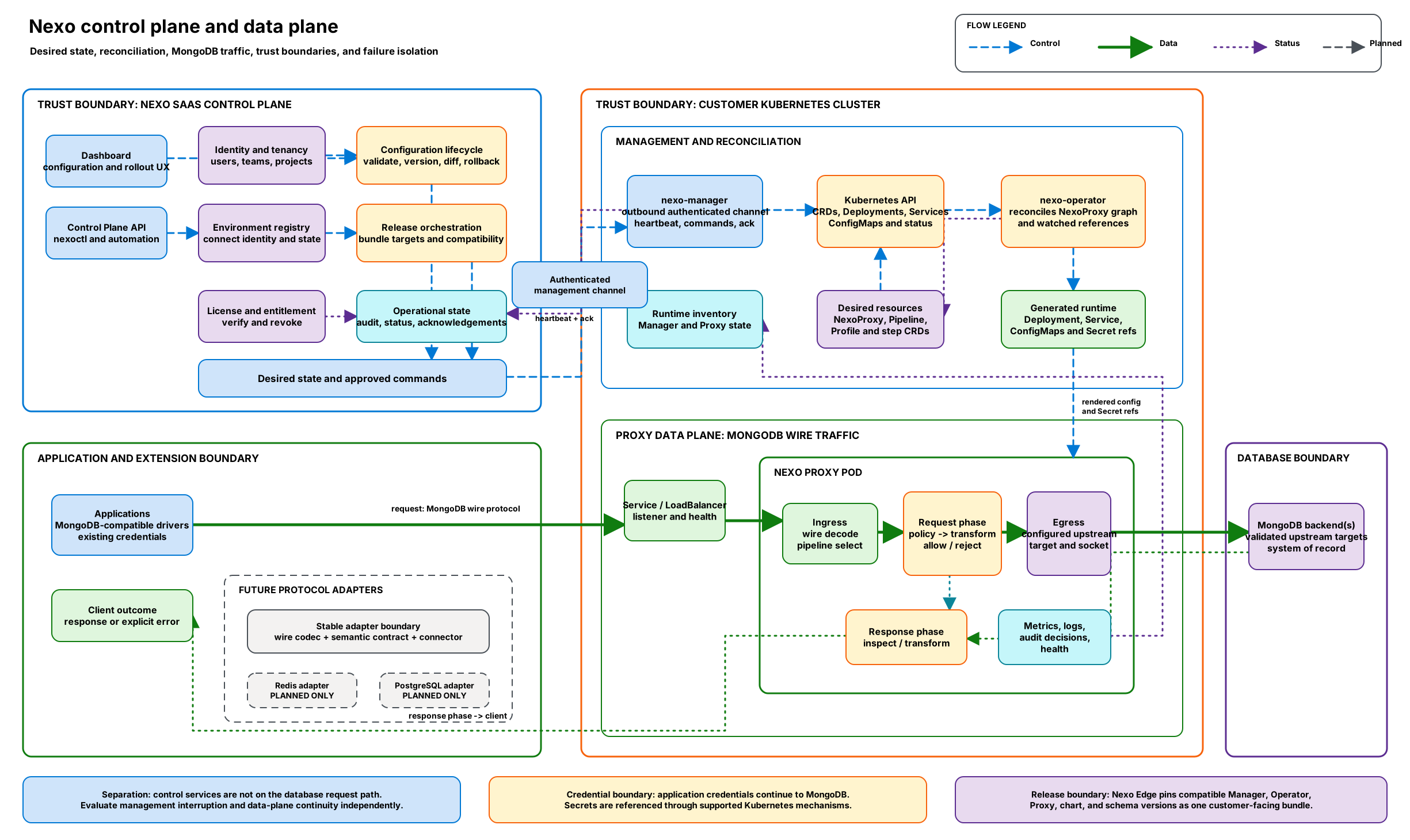
Dashed arrows show desired-state and reconciliation flow, solid arrows show MongoDB traffic, and dotted arrows show status, telemetry, and the response path. MongoDB is available for licensed Private Preview evaluations. Redis and PostgreSQL remain Planned and are not implemented.
Diagram resources: Open the SVG full screen · Download the editable Excalidraw source
Control plane
The control plane handles identity and tenancy, environment registration, configuration revisions, release orchestration, license state, and operational status. It produces approved desired state and receives runtime inventory and acknowledgements. It is not in the database application's request path.
Reconciliation sequence
- An administrator or automation updates configuration through the Dashboard or Control Plane API.
- The Control Plane validates and versions the desired configuration or release target.
- Manager exchanges heartbeat inventory, approved commands, and acknowledgements over its authenticated management connection.
- Manager applies desired resources through the Kubernetes API.
- Operator build
20260611.352-008260creconcilesNexoProxyand its watched references, then renders the Proxy Deployment, Service, ConfigMaps, and referenced Secrets. - Runtime and resource status returns through Kubernetes and Manager without becoming part of the application traffic path.
Data plane
The data plane accepts MongoDB-compatible connections through the customer Service, decodes wire messages, selects the active pipeline, applies ordered request components, routes permitted traffic, manages the upstream connection, and processes the response. Metrics, logs, audit decisions, and health signals are observability outputs. Its availability and capacity directly affect applications routed through it.
Request and response sequence
- A MongoDB-compatible driver connects to the customer-controlled Nexo Service.
- Proxy ingress decodes the message and selects the active validated pipeline.
- Request components can inspect, transform, allow, or explicitly reject the operation.
- Egress connects to
NexoProxy.spec.targetAddress. The pinned runtime does not execute the rendered router or connection phases. - MongoDB remains the system of record and returns the upstream response.
- Response components inspect or transform the result before it returns to the client.
Boundary behavior
- Publishing configuration and carrying database traffic are separate operations.
- Loss of management connectivity must be evaluated independently from loss of database connectivity.
- Operators should verify which configuration revision is active before and after a change.
- Secrets should be supplied through the supported secret mechanism, not embedded in pipeline definitions.
- The pinned Proxy controller does not watch
NexoTrafficSplit,NexoTenantIsolation,NexoQuerySizeLimit, orNexoVersionCompat. After changing one of those resources, trigger reconciliation of the owningNexoProxyand verify the active graph revision. - The MongoDB adapter is the only supported 0.2.0 protocol path; Redis and PostgreSQL are Planned and are not implemented.
Document and test behavior for control-plane interruption, data-plane restart, upstream unavailability, and configuration rejection in your environment.